Protecting Ad Accounts: How Cloaking Works and Why It's Essential in Affiliate Marketing
In the modern realities of digital marketing and affiliate traffic arbitrage, ad network moderation relies on advanced machine learning algorithms, deep behavioral analysis, and thorough verification of traffic sources. While ad platforms used to analyze only basic metrics, today's anti-fraud systems are capable of detecting the slightest inconsistencies in promotion policies.
Due to such strict control, cloaking has transformed from a secret "grey" tactic into an absolutely essential infrastructure element for any professional media buyer. It is precisely what protects campaign combinations, prolongs the life of ad accounts, and guarantees a stable return on investment (ROI). The technology allows you to filter out bots, hide aggressive landing pages from automated crawlers, and minimize the risk of bans from Facebook, Google Ads, TikTok, and other platforms.
What is Cloaking From a Technical Perspective?
Cloaking is an intelligent incoming traffic routing mechanism that displays different content to visitors based on their digital fingerprints and predefined filtering parameters.
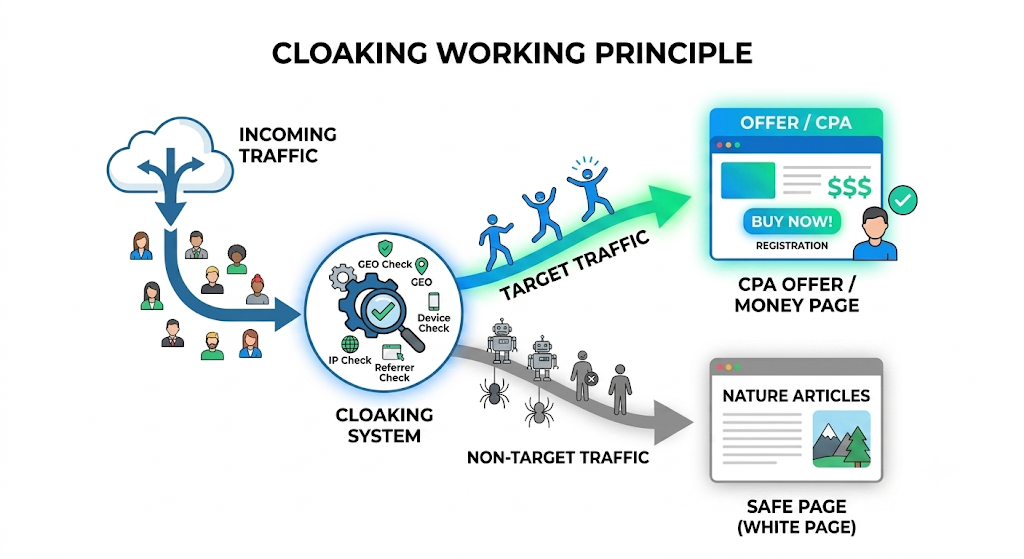
The system acts as an invisible traffic controller:
- Target audience (Real buyers) are directed to the page with the main offer (Money Page). Aggressive marketing tactics, sales triggers, and unconventional creatives can be used on this page.
- Moderators, botnets, spy services, and users with suspicious network parameters end up on a completely neutral and safe site (White Page). This resource 100% complies with all ad network rules, has a privacy policy, and does not raise suspicions.
This approach gives advertisers full control over exactly who sees the end of the sales funnel. This protection not only reduces the frequency of account bans but also reliably hides profitable campaign combinations from being stolen by competitors through popular spy services.
Advantages of Cloud Traffic Filtering
Just a few years ago, for high-quality traffic filtering, media buyers had to deploy their own servers, hire programmers, and manually configure complex databases. Today, the market offers convenient cloud solutions that cover all basic technical needs without having to write code.
One of the popular solutions on the market is Cloaking.House, which allows you to automate most routine processes.
Main technical advantages of modern cloud systems:
- Cloud infrastructure with no load on your device: All computational load, IP address analysis, and routing fall on the service's high-power servers. The user is relieved of the need to administer the backend and monitor uptime.
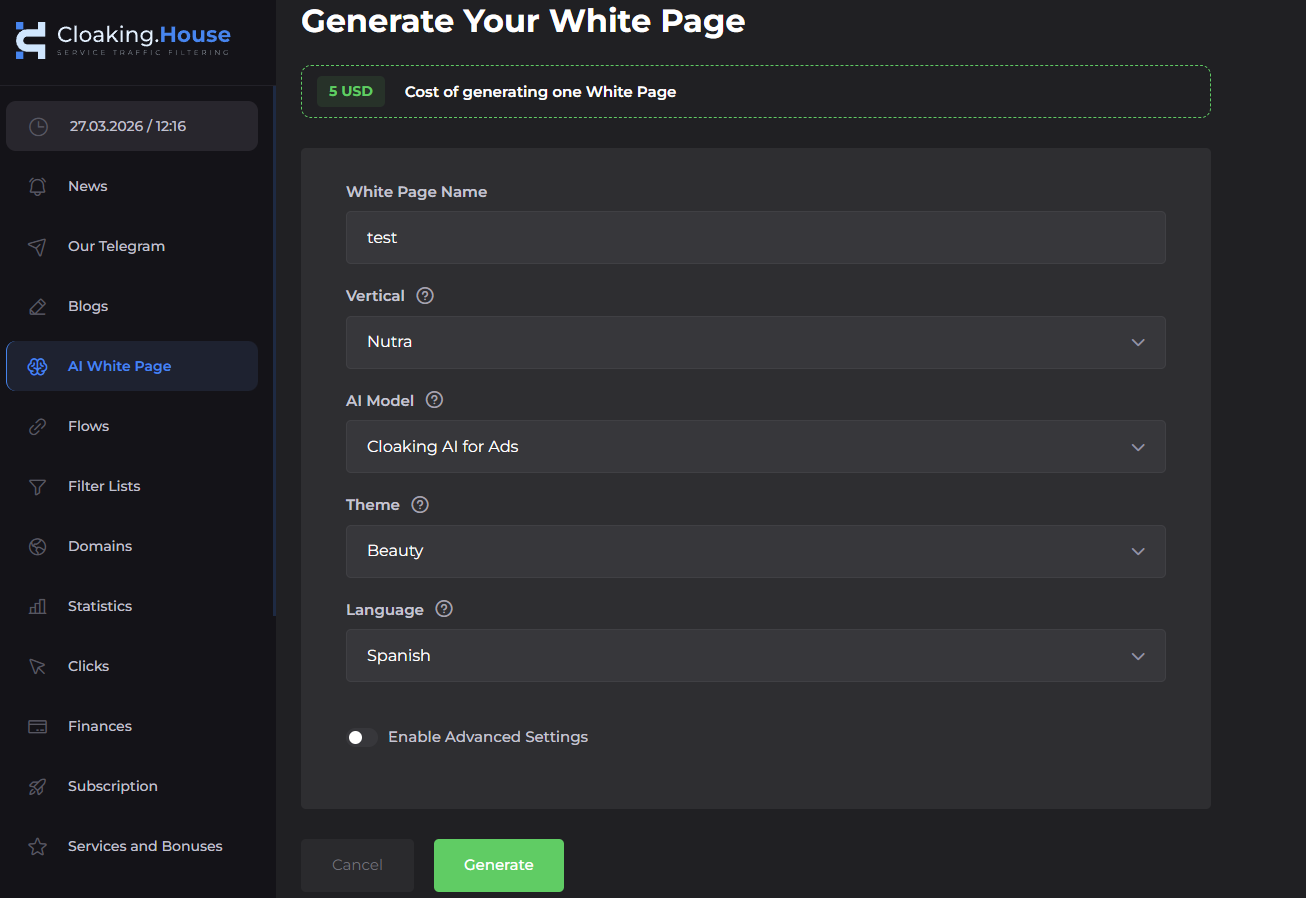
- Built-in AI White Page generators: You can now create "white" sites to pass moderation right in the service interface in a couple of clicks. Neural networks generate unique content that easily passes manual and automated checks.
- Predictive analysis and machine learning: Traffic is filtered by multiple parameters simultaneously: GEO, device type, operating system, Internet Service Provider (ISP), referrer data, and behavioral patterns.
- Dynamic threat databases: The cloud system continuously updates lists of IP addresses of known spy services, search crawlers, antiviruses, and botnets, instantly adapting to algorithm updates from advertising giants.
How Anti-Fraud Systems Work
To understand how to properly set up filters, it is important to know how checking algorithms work. An ad platform's anti-fraud system analyzes every click on your ad.
First and foremost, the following are checked:
- IP address and subnet: Whether the IP address belongs to a regular internet provider (Residential) or a data center server IP (Datacenter).
- User-Agent: Information about the browser and operating system. If a click comes from an outdated browser version that is no longer supported, it raises suspicion.
- Referrer: Exactly where the user came from. An empty referrer often indicates a direct bot visit.
- IPv6 addressing: Mass visits from cheap IPv6 addresses are often used by parsers and bots.
Modern cloaking analyzes all these parameters even before the page loads on the visitor's device, making a routing decision in milliseconds.
Step-by-Step Cloaking Setup
Integrating a cloud filtering system is intuitive and, with ready-made landing pages, takes only a few minutes. The process can be roughly divided into 5 sequential steps.
1. Preparing the White Page (Neutral Site)
The first step is to create a neutral site. This can be a blog, a company business card site, or an informational article. The main rule is that the site must fully match the theme of your ad but not violate platform rules.
Site files must be uploaded to your hosting and linked to a domain. Important technical nuance: Be sure to rename the main starting file of your "white" site from index.html to site.html (or white.html). This is necessary so that the filtering script's system file can take the place of the main file (index.php) in the root directory of your server.
2. Creating and Configuring Flows
A flow is a rule by which the service will process incoming traffic for a specific advertising campaign.
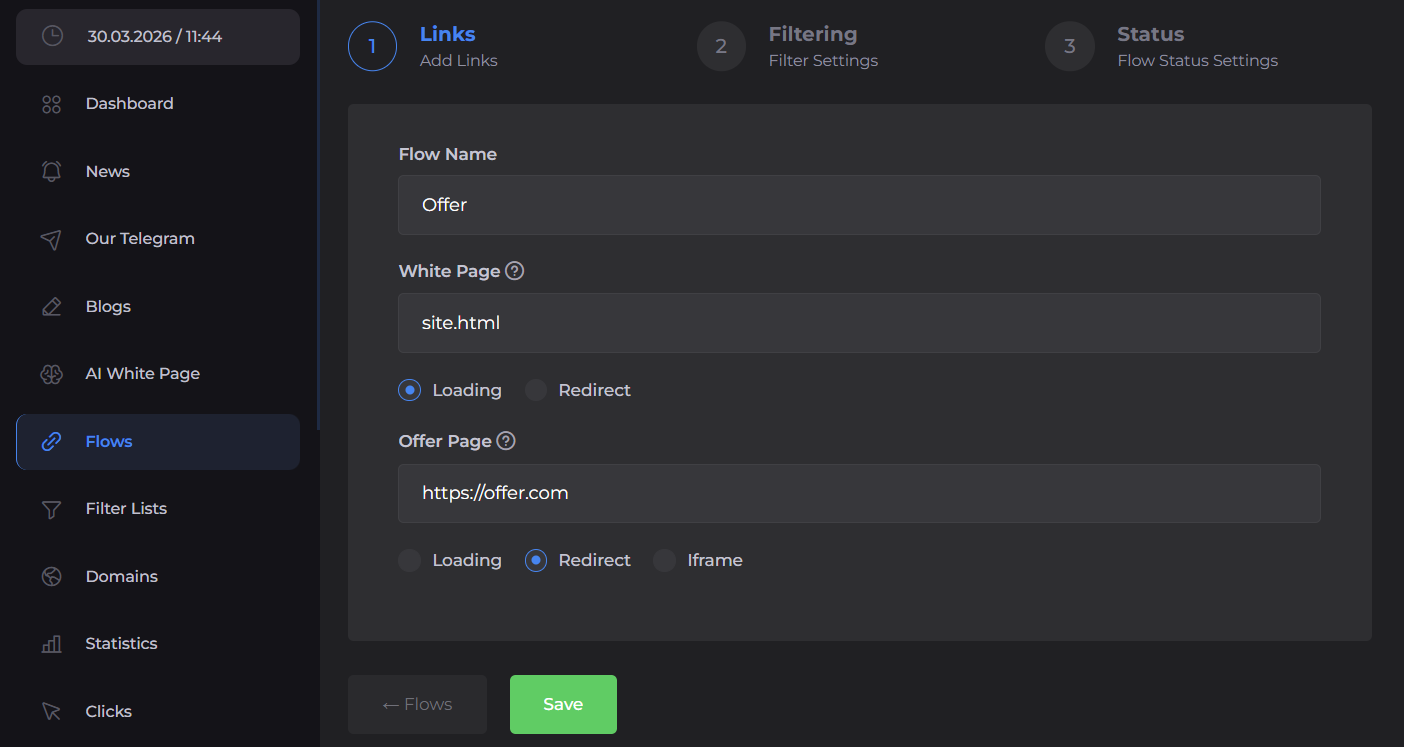
In the cloud service dashboard, you need to:
- Specify the path to your White Page (for example, the local file
site.html) and choose the content loading method (the Loading method is recommended so that the domain does not change in the browser bar). - Add a link to your target page with the offer and set the redirection method (Redirect is most commonly used).
3. Fine-Tuning Filters and Restrictions
It is at this stage that security rules are set.
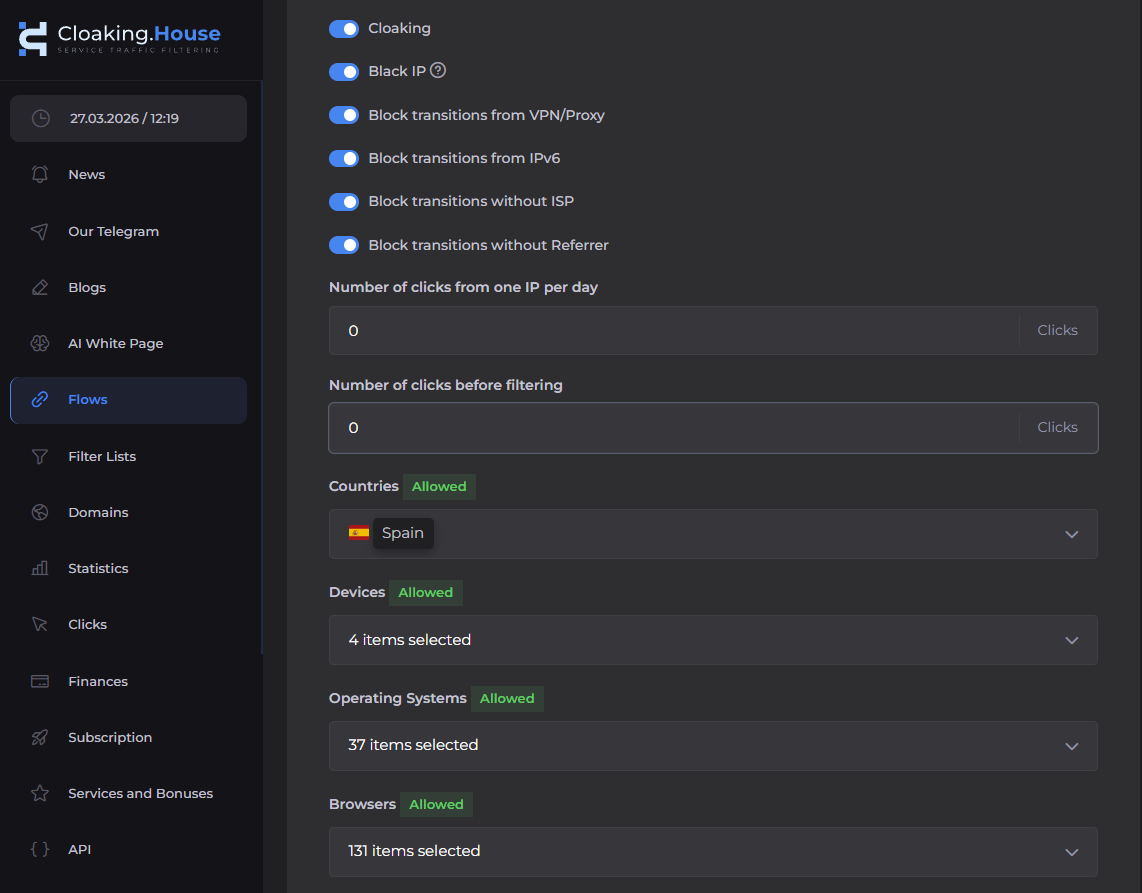
The platform offers flexible parameters that need to be customized for a specific traffic source:
- Basic blacklists: Mandatory activation of blocking known moderator IP addresses (Black IP) and corporate networks.
- Anomaly blocking: Disabling visits without an ISP or without a Referrer. This perfectly handles scripts that simulate clicks.
- VPN/Proxy blocking: Filtering out users who hide their location, which is typical for spy services.
- Strict targeting: Displaying the target offer is strictly limited to a specific GEO, specific mobile operating systems (e.g., iOS only), or device types. Any click that does not meet these strict parameters is sent to the safe White Page.
4. Integrating the Script on Hosting
After saving the flow settings, the system will generate a unique index.php file. This file must be downloaded and uploaded to the root folder of your domain on your hosting.
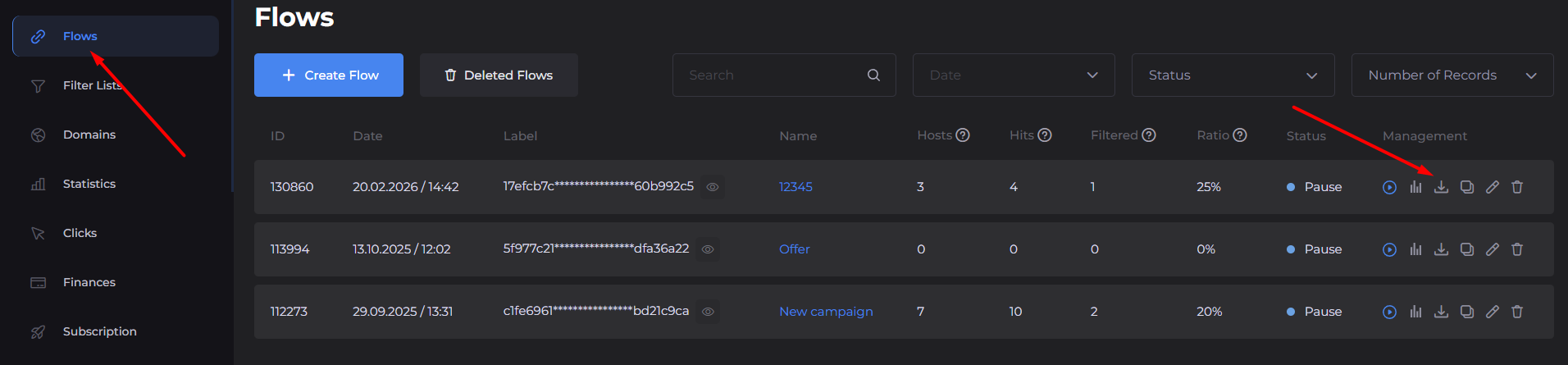
From this moment on, any user clicking on your ad link first accesses this PHP script, which connects to the cloud database and instantly decides what content to serve in response.
5. Analytics and Traffic Monitoring
Setting up cloaking does not end with installing the script. Professional work requires constant analysis.
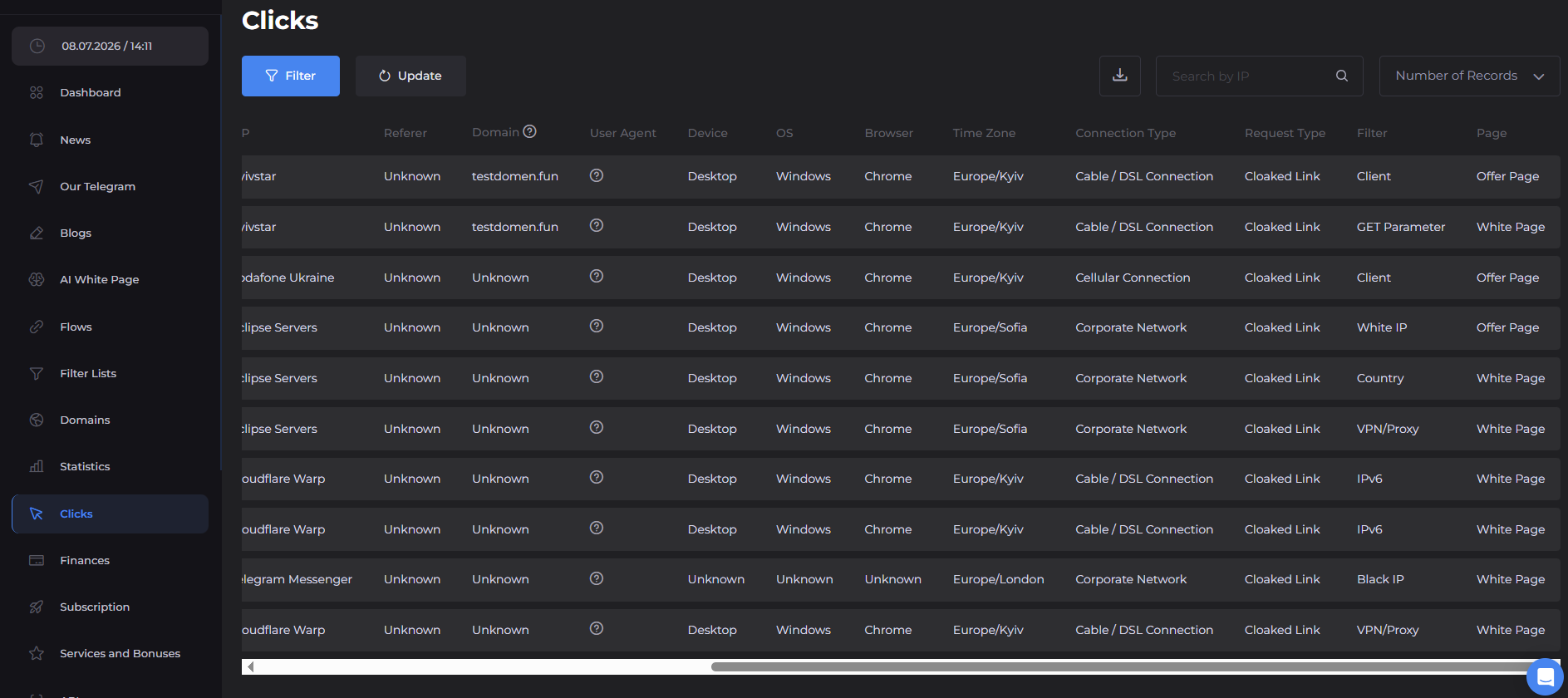
In the Statistics or Clicks section, detailed logs of every web request are collected:
- Visitor's time zone, network type, and provider.
- Device, operating system, and browser version.
- Triggered rule: The system shows in detail why a specific click was deemed non-targeted—which filter was triggered.
This array of data is critical for optimization.
Conclusion
Using intelligent traffic distribution systems is the foundation for scaling in modern internet marketing. Cloaking makes the filtering process reliable and automated, allowing media buyers to focus on creating creatives and finding new profitable combinations, rather than constantly fighting account bans.
A comprehensive approach, proper technical setup of flows, and deep analysis of traffic logs are the key to the longevity of your ad campaigns and stable, predictable profit.
Bonus for readers: Specifically for those who want to test intelligent traffic filtering without unnecessary risks, we have prepared a bonus. Register in the service and use the promo code AFFTRAFF, which gives a 30% discount on any monthly plan.
Share this article
Send it to your audience or copy an AI-ready prompt.